

I've long believed that Mozilla Firefox is a better option than Google Chrome. This is an informed understanding based on Firefox's impressive balance of performance, privacy, and additional features.
Sure, there was a time when I stuck with Chrome for a few reasons, including better integration with Google Account and products. However, over time, there were more reasons to shift than to remain loyal. Once I made the shift, things seemed genuinely better, and it mattered to me that I was using a non-Apple, non-Google browser engine too.
Soon, though, I realized that "just switch to Firefox" wasn't the magical solution it sounded like at first.

Delete Your Browser Now and Switch to This One Instead
Tired of Chrome's cluttered interface and privacy concerns? This alternative browser offers a streamlined experience without sacrificing speed or customization.
Firefox was the right call, but it didn't fix everything
Better foundations, same cluttered habits

I don't want to deny that Mozilla Firefox offers a better experience than Google Chrome. I worried less about targeted ads and had a better sense of privacy overall, all thanks to the wonderful foundations Firefox was built on. Although I appreciated its open-source nature and resource-efficient engine, Firefox did little to improve my browsing experience. Pretty soon, I was in the same world of tab clutter.
While I love that I can add a wonderful set of extensions to Firefox, it has always felt like it lacks several standard features that modern web browsing requires. Having to install third-party extensions for these features felt like a waste of computing resources, one way or another. It eventually meant that I had to look for something better.
There was the challenge, though: I didn't want to go back to a Chromium browser, much less Google Chrome. Given that Gecko is one of the few non-Google, non-Apple rendering engines, I wanted to find a web browser that uses it. That search was fortunate, and it ended when I came across Zen Browser.
 Quiz
QuizTrivia Challenge!
Chrome, Firefox, Edge, and Explorer over the years
From the browser wars to the rise of Chrome — find out how well you know the history of the web's biggest rivals.
In what year did Microsoft release Internet Explorer 1.0 as part of the Windows 95 Plus! pack?
Which browser did Mozilla Firefox evolve from before becoming a standalone product?
When did Google officially launch Chrome to the public for the first time?
At its peak dominance in the early 2000s, approximately what percentage of the browser market did Internet Explorer hold?
What was the internal project codename for Microsoft Edge when it was first being developed?
What milestone download number did Mozilla use in a major marketing campaign to celebrate Firefox's early popularity?
Which rendering engine does Google Chrome use to display web pages?
Which legal ruling found Microsoft had violated antitrust law partly due to its bundling of Internet Explorer with Windows?
Your Score
Thanks for playing!
The browser I almost scrolled past
A Firefox cousin that I assumed was just a reskin
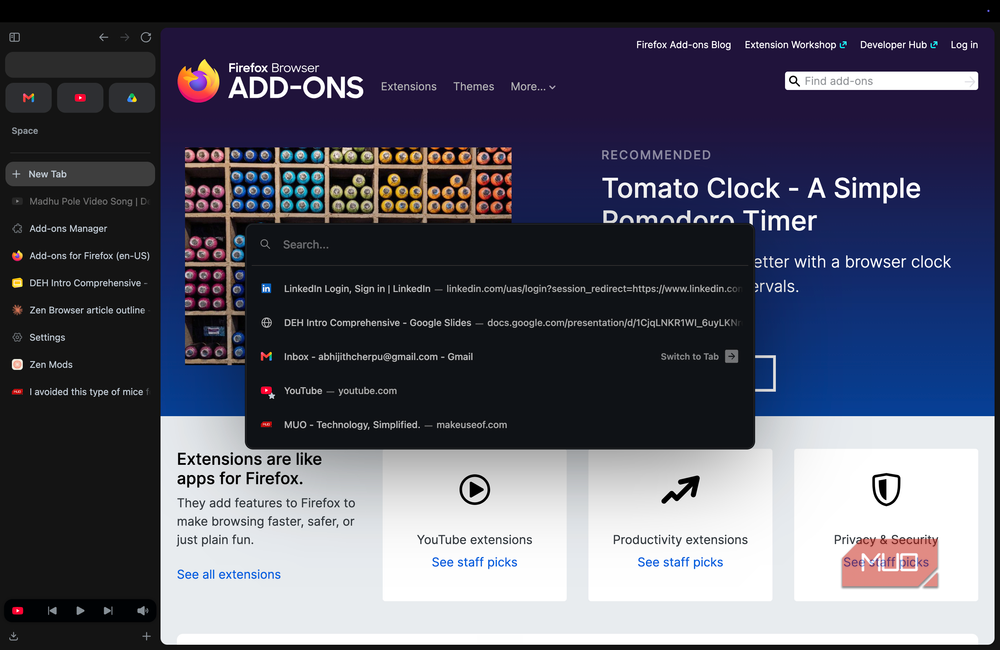
When I first heard of Zen Browser, I didn't really understand its potential. Instead, I thought it was another Firefox re-skin that didn't offer much. However, I was in for a surprise when I set it up on my Mac. It was also the time when I was heavily using Arc, a Chromium-based browser I loved for its workflow-optimized UI, among other features. Zen Browser, as it turned out, was something better.
Probably the first thing you notice in Zen Browser is a UI design that encourages you to work. It defaults to the vertical tabs interface but still offers a few customization options. So if you love browsers like Arc for their vertical tab design, Zen Browser will feel like home. However, you get additional customization options for look and feel. For instance, you can choose only the sidebar, the sidebar and top toolbar, or a collapsed sidebar. Overall, navigating dozens of tabs using Zen Browser feels effortless once you get the hang of it.
You also get a few more features built into Zen Browser's core UI. For instance, auto-clearing tabs and split-view mode make it effortless to multitask in the browser. I should, however, warn you that onboarding will feel a bit like you are coming from Google Chrome or Firefox.

This New Windows Browser Finally Delivers What Others Have Only Promised
Finally, a browser that does what others have claimed but not achieved.
The features that make Zen feel built, not bolted together
The stuff Firefox needs an extension drawer to fake
Now, vertical tabs are great, but they don't fully unlock your productivity! Fortunately, Zen Browser packs so many features that Firefox had to rely on third-party extensions for. Because these features are baked into the core web browser, you end up saving system resources as well.
Zen Browser supports workspaces, which are a great way to organize your different tabs. You can create multiple spaces and assign a specific profile to each for easy access. I love being able to shift between these spaces and profiles using gestures instead of opening a new window. If you manage multiple accounts for different aspects of your life, you'd love this feature. This feature has been a game-changer for how I navigate tabs.
This free web browser also offers many options for tab management. For instance, you can have essential and pinned tabs, which work differently. Auto-clearing tabs prevents background tabs from draining memory. On the other hand, Essentials becomes a safe way to keep the most important files easily accessible.
I also love the modding options built into Zen Browser, called Zen Mods. These are community-built tweaks you can install on your Zen Browser in a few seconds. While there are only 70+ mods available right now, they solve real needs. I particularly loved one that lets me perform advanced Find on Page searches.
These features work alongside the standard options, such as picture-in-picture for video, synchronization, and extension support.
What living with Zen Browser changed
Fewer tabs, less noise, a browser that gets out of the way
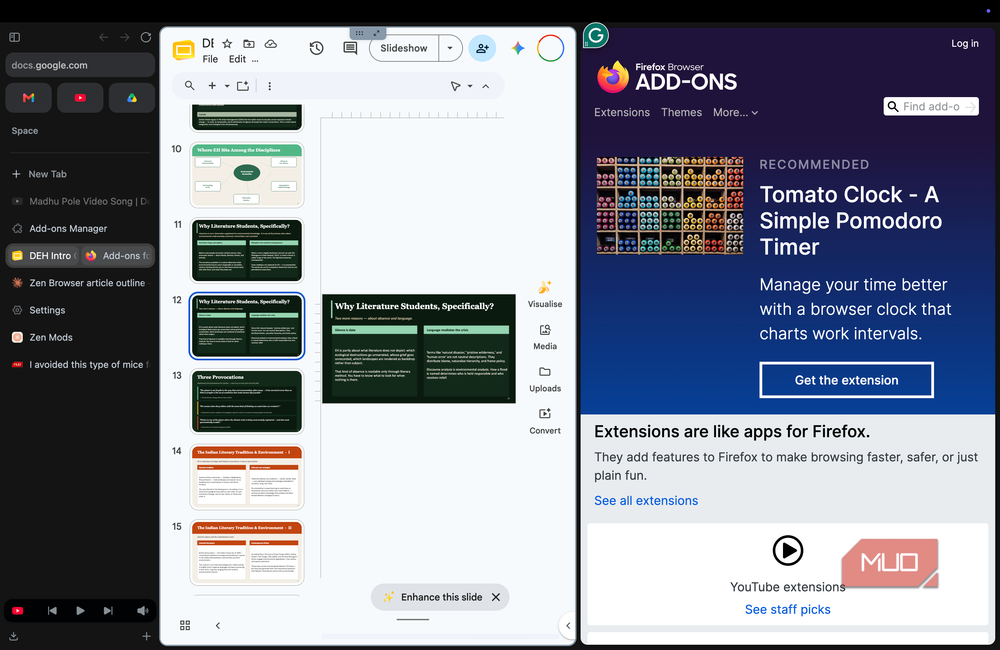
I'd say Zen Browser has made the entire web-browsing experience calmer and more productive. Thanks to how the browser manages tabs and workspaces, I have less tab clutter and noise. In particular, workspaces allow me to manage multiple aspects of my life tied to different accounts. It has led to a situation where almost every feature has made a meaningful difference in how I browse.
I also feel that Zen Browser gets out of my way when it is time. Sure, it supports a lot of features, modding, and options, but none of that stops me from focusing on the task when it is time. I believe the stronger foundations of Firefox are to be thanked here. I've also been a fan of how customizable this browser is from the start.
Overall, living with Zen Browser has been so great that I could almost say goodbye to all other browsers.
Where Zen still asks for patience
While it is pretty great, it would be a little wrong to pretend that Zen is perfect. We must remember that Zen Browser is still in active development, and you may encounter occasional glitches, but they are quick to resolve. You might also feel a lack of polish in areas such as extension compatibility and synchronization.
While these are not bottlenecks, you should definitely be aware of what you are getting into. In that case, Zen Browser might as well be the best web browser you should choose over Google Chrome and Firefox.

Zen Browser
- OS
- Windows, macOS, Linux
- Developer
- Mauro V
- Price model
- Free, Open-source
Zen Browser is a free, open-source web browser based on Firefox that is designed with a modern, highly customizable interface focused on privacy and productivity.