


For a year, I used smart plugs like remote-controlled power strips — just tapping an app to turn things on and off. I realize now I missed their real potential. There are creative ways to use smart plugs that I was missing.
Everything changed once I connected my plugs to Google Home. What felt like a gimmick became the backbone of my entire setup. If you still use app buttons, here’s what you’re missing.
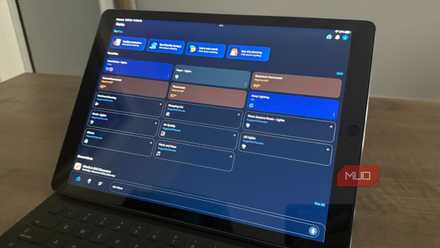
I turned my old tablet into a smart home dashboard, and it's perfect
I use my 1st-gen iPad Pro as a smart home dashboard
Why using smart plugs manually defeats the purpose
Smart plugs need an ecosystem, not just an app
Manual app control is fine as a fallback, but it defeats the whole point of having a smart home. If you have to pull out your phone to turn something on, you have replaced one inconvenience with a slightly more annoying one. Automations, like ones for cameras, are where these plugs actually prove their worth.
Smart plugs are inexpensive, widely compatible, and easy to install because they require zero wiring. That makes them the perfect gateway for connecting non-smart devices, like a floor lamp, a coffee maker, a fan, or a space heater, to a larger smart home setup. On its own, a plug is just a middleman. The real magic comes from what's pulling the strings.
When you connect a smart plug to a platform like Google Home, Amazon Alexa, or Apple HomeKit, you stop thinking about individual devices and start thinking about routines and rooms. The plug stops being something you control and becomes something your home manages on your behalf.
Most name-brand smart plugs, including models from TP-Link Kasa, Amazon, Wemo, and Meross, support at least one of the major platforms. Many support all three. The setup usually takes less than five minutes: add the device to your preferred app, assign it to a room, and it immediately becomes part of whatever automations you have already built.
Once it’s linked to your account, you can control it by voice, along with everything else. Telling Google to turn off the living room includes the lamp on that smart plug. Asking Alexa, which offers several impressive commands, to run your bedtime routine can shut down anything connected in the bedroom. You are no longer managing a plug. You are managing a space.
Why schedules are just the starting point for smart plug automation
Sunrise and sunset triggers beat fixed clock times
Most smart plug apps offer built-in scheduling, and plenty of people stop there. Setting a lamp to turn on at 7 a.m. and off at midnight is definitely useful. But when you move that schedule into Google Home or Alexa, it becomes part of a larger picture.
In Google Home, you can tie a plug to a sunrise or sunset trigger rather than a fixed clock time. That single change means your outdoor lights or porch lamp automatically adjust to the actual light conditions throughout the year without you ever touching the schedule again. In Alexa, you can build routines that chain plug actions with actions on other devices, so arriving home can trigger a sequence that turns on lights, adjusts the thermostat, and starts a fan or air purifier simultaneously.
Apple HomeKit takes this even further with its Automations tab, where you can set conditions like time of day, someone arriving or leaving, or even the state of another accessory. A plug connected to a bedside lamp can automatically turn off when your iPhone detects that you have left the bedroom, without a single tap.
How Away Mode turns a smart plug into a home security tool
Simulated occupancy works better than you'd expect

One feature that many platforms include, but people often overlook, is an away or vacation mode. In Google Home, you can set up a routine that activates when everyone has left the house. Alexa offers an Away Lighting feature that cycles lamps' plugs on and off at random intervals to simulate occupancy.
It sounds like a minor detail, but it offers huge peace of mind when you travel. Knowing your house looks lived-in every evening without any extra work is a massive perk. This kind of set-it-and-forget-it convenience turns a smart plug from a minor gadget into a home security asset.
How energy monitoring smart plugs can cut your electricity bill
Vampire draw is costing you more than you think

Not all smart plugs have energy monitoring, but those that do offer an eye-opening feature. Models like the TP-Link Kasa EP25 or Amazon Smart Plug with energy monitoring show real-time and historical wattage usage right in their apps, and many can share that data with Google Home or Alexa, too.
Connecting an older appliance to one of these plugs for a week can reveal exactly how much power your devices are vampire-sucking while idle. A game console left in rest mode, a desktop computer that never fully powers down, or an older TV can each be quietly adding dollars to your monthly electricity bill. Seeing the actual numbers makes it easy to build an automation that cuts power to those devices during hours you know you will not use them.
How device grouping makes your smart home feel like one system
Room-level control changes everything
Once your smart plugs are inside a platform like Google Home or HomeKit, you can group them alongside other smart devices into rooms. This is where a smart home finally starts feeling truly 'smart'. Saying "turn off the bedroom" or tapping a single room tile in the app affects every device in that room, whether it is a smart bulb, a plug-connected lamp, or a fan on a third-party outlet.
You can also build device groups across rooms. If you have a plug-connected air purifier in three different rooms, grouping them means one command runs them all. Managing devices at the group level, rather than at the individual device level, is the shift that makes a smart home feel cohesive, not a collection of separate gadgets.
How to get started: setup is faster than you expect
What to look for when buying new plugs

Making the switch is incredibly easy. If you already have smart plugs and a Google Home, Alexa, or HomeKit device in your house, the setup usually involves opening the platform app, going to the device discovery section, and following a short pairing flow. Many plug brands offer prebuilt integrations that authenticate via single sign-on.
If you are buying new plugs with this in mind, check the box for explicit platform support before making a purchase. A plug that lists Works with Alexa, Works with Google Home, or Works with Apple HomeKit on the packaging will connect cleanly and remain connected through firmware updates. Third-party compatibility claims from lesser-known brands can be unreliable over time.
Start with one routine
If you have been sitting on a drawer full of smart plugs and have a nagging feeling that you're wasting their potential, the easiest way to break the ice is with a single routine. Pick a plug connected to something you interact with every day, a bedside lamp, a coffee maker, a desk light, and build a single time-based or arrival-triggered automation around it.
Once that routine runs reliably in the background for a week without you touching it, expanding your setup becomes a no-brainer. You will want the coffee maker ready when your morning alarm goes off. You will want the living room lamps on when you pull into the driveway. You will stop reaching for your phone and start expecting your home to already know.
Stop treating your smart plugs like glorified extension cords. Plug them into an ecosystem, build your first routine, and let your house finally do the heavy lifting for you.

meross Smart Plug
- Brand
- meross
- Connectivity
- Wi-Fi
- Integrations
- Apple HomeKit, Amazon Alexa, Google Assistant
- Schedules
- Yes